Home › AI Shop › Coding helpers › 20 files that teach an AI coding helper how to work
🌐 한국어 · English · 日本語 · 简体中文 · Español · Français · Deutsch · Português · Tiếng Việt · Bahasa Indonesia · ไทย
20 files that teach an AI coding helper how to work
What you get out of it: Your AI sums up meetings, bug reports and code reviews in the same clear shape every time. You receive: 20 instruction files for AI tools (English, zip) + 2 PDFs (Korean & English) · download right after payment
$14.99 (≈ ₩21,000) · ⚡ Instant download · No shipping fee
$14.99 (≈ ₩21,000) Buy now — $14.99 (≈ ₩21,000)
How to use (3 steps)
- ① Pick — choose the one you like.
- ② Pay — by card or PayPal.
- ③ Get it now — open the file and follow along.
Screenshots
What you get out of it
- Who it's for: Developers who use AI tools like Claude Code
- You receive: 20 instruction files for AI tools (English, zip) + 2 PDFs (Korean & English) · download right after payment
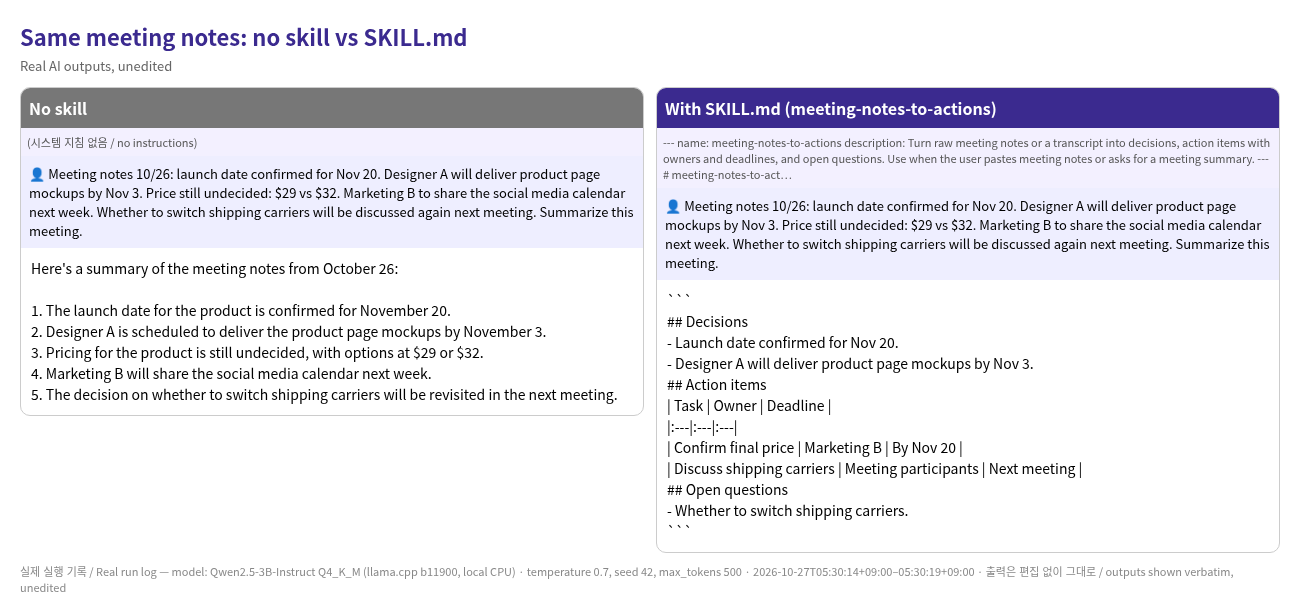
- Turn meeting notes into a table of decisions, action items and open questions.
- Turn a vague problem into a reproducible bug report.
- Check your own SKILL.md files with the included validator (all 20 pass).
Honest test result
The same meeting notes went to a small free AI (Qwen2.5-3B), once in Korean and once in English. Left: no instruction file. Right: with the SKILL.md file. With the file, the answer kept the decisions / to-do table / open questions format. Mistakes remained: in Korean it put one to-do (the social media calendar) under open questions, and in English it invented an owner and deadline for the price decision. Without the file, the Korean answer invented the year 2023. Automatic loading by AI tools was not tested.
What's inside
- 20 skill folders (skills.zip), one SKILL.md each
- Format validator script validate_skills.py
- 2 PDFs (Korean 23 pages / English 24 pages, full text of all 20 files)
- Real AI before/after log. Automatic loading in agent tools was not tested
$14.99 (≈ ₩21,000) Buy now — $14.99 (≈ ₩21,000)
FAQ
How do I get my file after paying?
A download page opens right after payment. The same download link is also sent to the email you entered at checkout. Nothing is shipped and there is no shipping fee.
I didn't get the email.
Check your spam or promotions folder, and make sure the email you entered at checkout is correct.
How do I download again?
Open the download link in your email again. If you lost the email, contact us through the Payhip store page below.
Which payment methods work?
Payhip handles payment. Usually you can pay by credit/debit card or PayPal; the exact options are shown on the checkout screen. Prices are in US dollars (USD).
What file formats?
Mostly PDF. Some products also include TXT, CSV, JSON, images or install scripts. Each product's "What's inside" lists them exactly.
Related products
- 8 helpers that write replies to your online-shop customers — Drafts for customer questions, refunds and reviews appear on their own. You check before anything is sent.
- 100 lines to ask AI for coding help clearly — Ask AI for bug fixes, tests and code reviews clearly, and get fewer off-target answers.